
Table of Contents
- What Canva Templates for Digital Products Can You Create and Sell?
- Canva Digital Product Ideas That Actually Sell
- How to Create Professional Canva Templates Step-by-Step
- Selling Digital Products on Etsy with Canva Templates
- Using Canva Lead Magnet Templates to Build Your Customer Base
- Legal Considerations When Selling Canva Templates
- Scaling Your Canva Template Business for Long-Term Revenue
- Canva Pro vs. Canva Free: Which Is Right for Selling Templates?
Canva Templates for Digital Products: Step-by-Step Guide
Last Updated: July 26, 2026
Creating and selling digital products has become one of the most accessible ways to generate income online. Canva templates have democratized design, allowing entrepreneurs to launch profitable businesses without hiring designers or learning complex software. The real challenge is knowing what to create, where to sell it, and how to market it effectively.
What Canva Templates for Digital Products Can You Create and Sell?
The most successful creators focus on templates that solve specific problems for their target audience.
High-Demand Template Categories
Social media content templates remain the highest-volume category. Instagram posts, Pinterest pins, TikTok graphics, and LinkedIn carousels sell consistently because content creators need fresh, on-brand assets they can customize and post within minutes.
Business templates form another strong category: invoices, proposals, contracts, and business cards. Small business owners and freelancers need these constantly and will pay for templates that save design time.
Planners and printables appeal to a different audience. Digital planners, budget worksheets, meal planning templates, and organizational systems sell especially well to people seeking systematic approaches to their lives.
Educational templates are growing fast. Workbook templates, course slide decks, quiz templates, and interactive worksheets appeal to course creators with less competition than social media templates but equally strong demand.
Identifying Low-Competition Niches
The mistake most new creators make is targeting broad categories like "Instagram templates." Instead, look for specificity: "Instagram templates for wedding photographers" or "Instagram templates for mental health coaches."
Specificity reduces competition dramatically. A template designed for dog trainers will outrank a generic social media template because it speaks directly to that niche’s needs. Low-competition niches target a specific profession or hobby, solve a particular pain point, and are specific enough to describe in one sentence.
Canva Digital Product Ideas That Actually Sell
Social Media Templates and Content Creation Assets
Content creators are the largest buyer segment for Canva templates. Successful social media template bundles include variations for different content types: promotional posts, educational content, behind-the-scenes shots, testimonials, and engagement-driving questions. Templates that include mockups showing what the design looks like on an actual Instagram feed convert better because buyers can visualize the final result.
Niche-specific templates perform better than generic ones. Templates for fitness coaches, real estate agents, nutrition coaches, and e-commerce brands sell better than generic business templates because they include industry-specific language, color schemes, and design elements.
Printables, Planners, and Workbooks
The printables and planners market has evolved significantly. What started as simple PDF downloads now includes interactive digital planners, Notion templates, and comprehensive workbook systems.
Planners work because they address a real pain point: organization. A budget planner, meal planning system, or project management workbook gives buyers a framework they can immediately implement. The best-selling planners solve specific problems: managing household budgets, planning a wedding, organizing a small business, or building a fitness routine.
Workbooks guide users through a process with fill-in-the-blank sections and exercises. A workbook on "Starting a Canva Template Business" or "Building Your Brand Identity" can command higher prices because it delivers more value than a simple template. The key to success is depth, a planner designed specifically for freelancers managing multiple clients, with sections for project tracking, invoicing, and time management, has a clear audience and less competition.
Business and Marketing Materials
Small business owners need marketing materials constantly. Brand kits, presentation templates, email templates, and marketing graphics solve real business problems.
Presentation templates for specific industries perform well. "Presentation templates for SaaS pitch decks," "Presentation templates for nonprofit fundraising," or "Presentation templates for consulting proposals" all have clear buyer personas with specific needs.
Email templates represent an underrated category. Many email marketing platforms offer basic templates, but branded, niche-specific email templates for welcome sequences, promotional campaigns, or customer retention sequences sell well because they’re ready to customize and deploy.
How to Create Professional Canva Templates Step-by-Step
Creating templates professionally requires attention to detail and understanding how buyers will actually use them.
Step 1: Choose Your Template Type and Dimensions
Start by deciding what you’re creating. Different products have different dimensions: a Pinterest pin is 1000×1500 pixels, an Instagram post is 1080×1080, an email header is 600×200, and a printable planner page is 8.5×11 inches at 300 DPI.
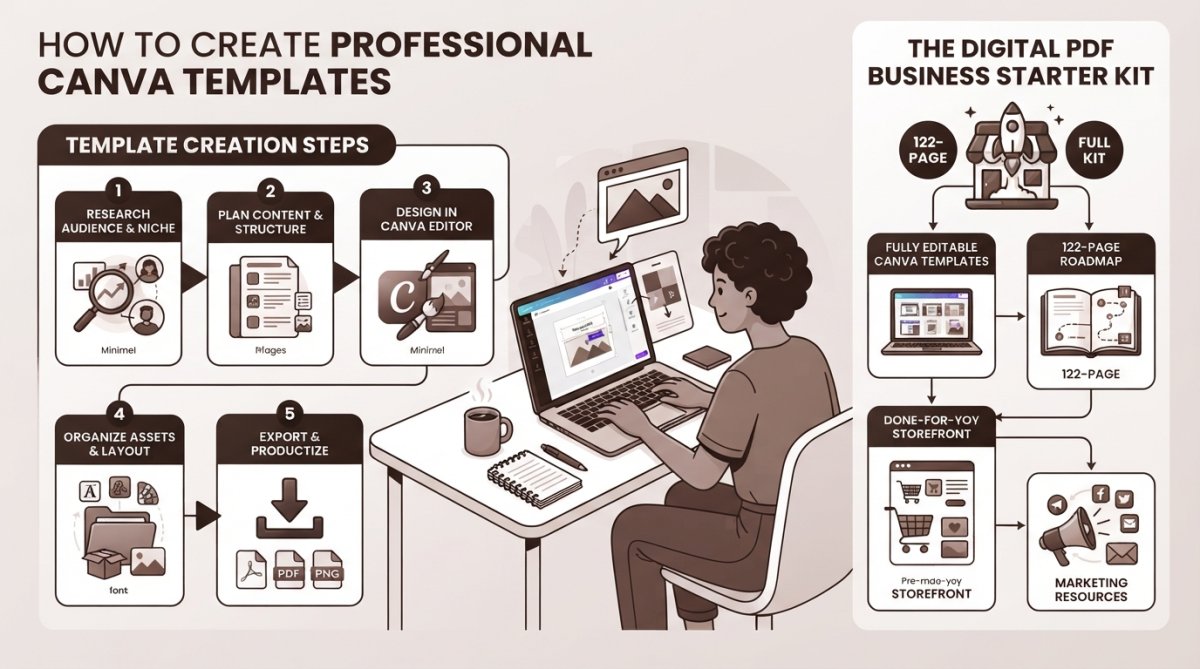
Canva makes this easy, when you create a new design, you can search for specific dimensions or select from presets. Design with customization in mind: Will buyers add their own photos? Change text extensively? Adjust colors?
Step 2: Design with Customizable Elements
The difference between a good template and a great one is how easy it is to customize. Professional templates use consistent fonts, spacing, and color schemes that users can modify without breaking the design.
Create clear hierarchy. The most important information should be visually dominant. Use color schemes strategically with a limited palette (3-5 colors) that users can easily swap. Typography matters enormously, use 2-3 fonts maximum, pairing a bold headline font with a clean body font. Leave breathing room and white space to give customizers room to add content without feeling cramped.
Step 3: Create Template Links and Delivery Formats
Canva allows you to create shareable links to your templates. When you finish designing, click "Share," select "Can edit," and generate a link. This link becomes what you deliver to buyers, they click it and the template opens in their Canva workspace ready to customize.
Consider creating template bundles. Instead of selling individual templates, bundle 5-10 related templates at a slightly higher price point. Bundles increase perceived value and average order value.
Common Design Mistakes to Avoid
Overcomplicating designs is the most common mistake. Beginners often add too many elements, fonts, or colors, making templates harder to customize. Simplicity sells.
Using low-quality images or graphics damages credibility. If you’re including images, use high-quality stock photos or create your own graphics.
Templates that don’t work across different content needs won’t sell. Test ruthlessly before selling by customizing templates as a buyer would, testing different text lengths and color combinations.
Failing to optimize for mobile viewing is increasingly costly. Many buyers will customize templates on phones or tablets. Ensure designs work on small screens with readable text and properly spaced touch-friendly elements.
Selling Digital Products on Etsy with Canva Templates
Etsy remains one of the most popular platforms for selling digital products, particularly templates, with built-in buyer traffic and a culture of purchasing digital assets.
Setting Up Your Etsy Shop for Digital Products
Creating an Etsy shop takes minutes, but optimizing it for template sales requires strategy. Choose a shop name that reflects your niche. "SarahDesigns for Coaches" immediately signals what you sell better than "SarahDesigns."
Your shop policies matter. Clearly state that products are digital and non-refundable. Explain what buyers will receive, how they’ll access files, and include instructions for using Canva template links.
Create a cohesive shop aesthetic using consistent branding in your shop banner, profile picture, and product screenshots. Your shop description should explain who your templates are for and what problems they solve.
Optimizing Listings for Marketplace Visibility
Etsy’s search algorithm rewards listings that match what buyers search for. Keyword research is essential. Look at what successful template sellers use in their titles and tags.
Your product title should include the primary keyword and be descriptive. "5 Canva Instagram Templates for Wellness Coaches" captures how buyers actually search better than "Instagram Templates."
Write product descriptions that address buyer concerns. Explain what’s included, how to use the templates, what they can customize, and what results they can expect. Use all 13 available tags strategically, including variations of your main keywords: "canva templates," "instagram templates for coaches," "editable templates," "digital templates."
Research what similar templates sell for on Etsy. Most individual templates sell for $3-8, bundles for $10-25. Start with competitive pricing, then raise prices as you accumulate reviews.
Etsy buyers heavily weight recent reviews. Consider offering a small discount on your first few sales to accelerate reviews. Once you have 10-15 positive reviews, raise prices to market rate.
Using Canva Lead Magnet Templates to Build Your Customer Base
Lead magnets are free templates you offer in exchange for email addresses. They’re one of the most effective ways to build an audience and eventually sell higher-ticket products.
Creating Lead Magnets That Convert
The best lead magnets solve a specific problem for a specific audience. A free "Instagram Caption Templates" appeals to content creators. A free "Budget Planner Template" appeals to people managing money. Your lead magnet should be genuinely useful, a complete, valuable resource that stands alone.
Consider your audience’s journey. If you’re selling coaching services, a free brand identity template positions you as an expert. If you’re selling Canva template bundles, a free template introduces buyers to your style and quality.
Delivering Digital Assets and Building Your Email List
When someone claims your lead magnet, they should receive immediate access. Use an email service like ConvertKit’s free email marketing platform or Mailchimp to automate delivery.
Follow up with value-driven emails. Don’t immediately sell, share tips, templates, and resources related to your niche. Build trust and demonstrate expertise. After 5-7 emails of genuine value, introduce your paid products.
Segment your email list based on behavior. People who download coaching templates are interested in coaching-related products. Send targeted offers based on what they’ve downloaded. Track which lead magnets perform best and double down on high-performing niches.
Legal Considerations When Selling Canva Templates
Understanding Canva’s terms and intellectual property rules is essential before you start selling templates.
Understanding Canva’s Terms of Service and Commercial Use
Canva explicitly allows commercial use of designs created with Canva, including selling templates. However, you cannot sell Canva’s built-in elements, fonts, or graphics directly, only designs that incorporate these elements.
Canva Free allows commercial use, but some premium elements are restricted. Canva Pro includes commercial rights to all premium elements. If you’re selling templates, Canva Pro ensures you have clear rights to everything in your designs.
Licensing and Intellectual Property Protection
When you sell a Canva template, you’re granting buyers a license to use it for their own purposes, not transferring ownership.
Your license agreement should specify what buyers can and cannot do. A simple statement works: "You may customize and use this template for personal and commercial purposes. You may not resell this template or claim it as your original design."
Never use copyrighted images, fonts, or graphics without proper licensing. Stick to Canva’s library, licensed stock photos, and fonts with clear commercial use rights. One copyright complaint can shut down your entire shop.
Scaling Your Canva Template Business for Long-Term Revenue
Most template creators start with a handful of products and gradually expand. The most successful ones build systems that generate consistent revenue without constant new product creation.
Building Systems for Recurring Sales
Once you’ve created and listed a template, it can generate sales for years with minimal ongoing effort. Focus on evergreen products that solve permanent problems.
Create product variations instead of entirely new products. If you’ve created "Instagram Templates for Coaches," create "Instagram Templates for Fitness Coaches" and "Instagram Templates for Life Coaches." You’re reusing your design system but targeting different niches, multiplying sales without proportional work.
Build email sequences that promote your entire catalog to new subscribers. Every lead magnet subscriber becomes a potential customer for your entire product line.
Advanced Marketing Strategies for Digital Products
Most template sales come from marketplace search. But the most successful creators supplement this with their own marketing channels.
Building a social media presence in your niche drives traffic to your products. A TikTok account showing how to use your templates, a Pinterest board sharing designs, or an Instagram account demonstrating customization brings buyers directly to your shop.
Content marketing works particularly well. A blog post on "How to Create a Consistent Brand Identity" or "5 Social Media Templates Every Coach Needs" attracts search traffic and positions you as an expert. Include links to your templates.
Research shows that creators with email lists generate 3x more revenue than those relying solely on marketplace sales. Building an email list should be a priority as you scale.
Canva Pro vs. Canva Free: Which Is Right for Selling Templates?
Canva Free includes access to thousands of design elements, fonts, and templates. You can create and sell templates using the free tier, though some premium elements are restricted.
Canva Pro costs approximately $180 annually. It includes commercial rights to all premium elements, giving you access to significantly more design resources. Pro also includes brand kits for consistent branding across templates.
For most template creators starting out, Canva Free is sufficient. However, if you’re creating templates in competitive niches where design quality matters significantly, Canva Pro’s $180 annual investment pays for itself quickly through access to premium design elements and features like resizing.
Building a sustainable digital product business with Canva templates is entirely achievable for beginners without design experience. The real challenge is choosing the right niches, understanding your audience’s needs, and marketing effectively. The Digital PDF Business Starter Kit addresses this by providing fully editable, brandable Canva templates across multiple categories, a 122-page roadmap guiding you through the entire process, and done-for-you marketing templates that accelerate your launch. Rather than spending months researching and designing, you can start selling within days. Get started with The Digital PDF Business Starter Kit and launch your template business immediately, keeping 100% of your profits.
Frequently Asked Questions
What kind of digital products can I create with Canva templates?
You can create a wide variety of digital products using Canva templates, including social media templates for content creators, printables like planners and workbooks, marketing materials such as branding kits and presentations, eBooks with customizable layouts, lead magnets to grow your email list, invitations and greeting cards, and online course materials. The drag-and-drop design tools make it accessible even without graphic design experience, allowing you to develop professional-looking products across multiple niches.
Can I sell digital products made with Canva templates commercially?
Yes, you can sell digital products created with Canva templates, but you must follow Canva's terms of service regarding commercial use. Canva Pro gives you broader commercial rights than Canva Free. When selling templates, ensure you're using original designs or properly licensed elements from Canva's library. Always review the specific licensing terms for any design elements you incorporate, and avoid reselling Canva's templates directly without significant customization and added value to your customers.
Do I need Canva Pro to create and sell digital products?
You can start with Canva Free, which includes thousands of templates and design elements. However, Canva Pro offers additional benefits for selling digital products, including access to more premium templates, brand kits for consistency, higher resolution exports, and clearer commercial licensing rights. For a serious digital product business focused on passive income and scaling, upgrading to Canva Pro is typically recommended to maximize your product quality and avoid potential licensing complications.
What are the best-selling digital products to create with Canva templates?
The most profitable Canva digital product ideas include social media templates (Instagram posts, Pinterest pins, TikTok graphics), printable planners and workbooks, lead magnets designed to build customer bases, presentation templates for businesses, branding kits for small business owners, and niche-specific templates in low-competition areas. Success depends on identifying your target market and creating products that solve specific problems. Research marketplaces like Etsy to identify trending templates and gaps where your customizable designs can stand out.
How do I deliver Canva templates to customers after they purchase?
When selling on Etsy or other marketplaces, digital products are typically delivered as downloadable files. You can provide customers with a direct template link to the Canva design (if using Canva's sharing feature), a PDF export, or instructions for accessing a customizable version. Etsy automatically handles digital delivery after purchase. For your own website or email list, you can send template links via email or host files on cloud storage. Always ensure your delivery method is clear in your product description so customers know exactly what they're receiving.
This article was written using GrandRanker